
Connecting the Dots: Local Ollama with OpenAI's SDK
To call a local Ollama instance using the official OpenAI NPM package, you just need to point the configuration's baseURL to your local Ollama server (http://localhost:11434/v1) and provide a dummy apiKey.
Here is the complete step-by-step setup and code to process a user's question.
1. Installation
Install the official OpenAI JavaScript library in your project:
npm install openai2. Make sure Ollama is running and model is downloaded
Before executing the script, make sure your local Ollama server is running (typically defaults to port 11434) and that you have pulled the model you want to use (e.g., llama3.2 or mistral).
ollama pull llama3.23. JavaScript Implementation
Create a file (e.g., index.js) and use the following code to pass a user's question to your local model:
import OpenAI from 'openai';

// 1. Initialize the client targeting the local Ollama instance

const openaiClient = new OpenAI({
  baseURL: 'http://localhost:11434/v1', // Redirects requests to Ollama
  apiKey: 'ollama',                      // An API key is required by the SDK but ignored by Ollama
});

async function askSubraAI(userQuestion) {
  try {
    // 2. Call the chat completions API
    const completion = await openaiClient.chat.completions.create({
      model: 'llama3.2', // Replace with any model you have downloaded locally via Ollama
      messages: [
        { role: 'system', content: 'You are a helpful and concise assistant.' },
        { role: 'user', content: userQuestion }
      ],
    });

    // 3. Output the response
    console.log("\n\n\nAI Response:\n");
    console.log(completion.choices[0].message.content);
  } catch (error) {
    console.error("Error communicating with local Ollama:", error);
  }
}
// Example usage:

const question = 'Why is the sky blue?';
askSubraAI(question);
Completion response
{
  "id": "chatcmpl-945",
  "object": "chat.completion",
  "created": 1789188116,
  "model": "llama3.2",
  "system_fingerprint": "fp_ollama",
  "choices": [
    {
      "index": 0,
      "message": {
        "role": "assistant",
        "content": "The sky appears blue because of a phenomenon called scattering, which occurs when sunlight interacts with the tiny molecules of gases in the Earth's atmosphere, such as nitrogen and oxygen. \n\nWhen sunlight enters the atmosphere, it encounters these tiny molecules and is scattered in all directions. The shorter, blue wavelengths of light are scattered more than the longer, red wavelengths, due to their smaller size and higher energy. This is known as Rayleigh scattering, named after the British physicist Lord Rayleigh, who first described the phenomenon.\n\nAs a result of this scattering, the blue light is distributed throughout the atmosphere, making it visible to our eyes from the ground. This is why the sky typically appears blue during the daytime, especially in the absence of clouds or pollution.\n\nHowever, the color of the sky can vary depending on the time of day and atmospheric conditions. For example, the sky can appear more red or orange during sunrise and sunset due to the scattering of light by atmospheric particles and the lower angle of the sun."
      },
      "finish_reason": "stop"
    }
  ],
  "usage": {
    "prompt_tokens": 39,
    "prompt_tokens_details": {
      "cached_tokens": 15
    },
    "completion_tokens": 201,
    "total_tokens": 240
  }
}
Explanation of completion response
This JSON object is the standard payload returned by an OpenAI-compatible API (in your case, Ollama running llama3.2 locally).
Here is the breakdown of what each part of this response means, grouped by its function:
1. Core Metadata
- "id": "chatcmpl-159": A unique identifier assigned to this specific chat completion request.
- "object": "chat.completion": Confirms the type of object returned. In this case, it is a chat completion response.
- "created": 1789187010: A Unix timestamp indicating exactly when the response was generated.
- "model": "llama3.2": The specific AI model that processed your request.
- "system_fingerprint": "fp_ollama": A unique fingerprint indicating the backend system architecture or configuration that ran the model. Here, it explicitly tells you it was served by Ollama.
2. The AI's Output (choices)
The choices array contains the actual answers generated by the model. It is an array because you can technically ask the API to generate multiple alternative answers at once (though it defaults to one).
- "index": 0: The position of this answer in the list (starting at zero).
- "message": Contains the generated message payload.
- "role": "assistant": Confirms that this message was generated by the AI assistant (as opposed to the user or system).
The role in the response is always "assistant" because that parameter identifies who is speaking in that specific message object.
In the chat completions framework, there are three primary roles used to track the conversation history:
- "system": The developer sets this to give instructions on how the AI should behave.
- "user": This represents the human (you) asking the question.
- "assistant": This represents the AI model generating the answer.
- When you send a message with
{ role: 'user', content: userQuestion }, you are telling the engine: "Hey, a human user is saying this text right now."
The model then processes that text and creates a brand-new response payload. Because the AI model is the one generating that text payload, its author role will always be flagged as "assistant" to keep the dialogue records clean, logical, and structured.
- Why this structure matters: This rigid labeling structure allows you to pass the response cleanly back into your next API request to build an ongoing conversation thread like this:
const conversationHistory = [
  { role: 'user', content: 'Hi, I am Subrata.' }, // User speaks
  { role: 'assistant', content: 'Hello Subrata! How can I help you today?' }, // Assistant responds
  { role: 'user', content: 'What is my name?' } // User speaks again
];
By keeping the generated output role locked as "assistant", the SDK guarantees that both your code and the AI backend always know exactly who said what.
- "content": The actual textual answer text generated by the model (explaining why the sky is blue).
- "finish_reason": "stop": This tells you why the AI stopped generating text. "stop" means the model naturally finished its thought and hit its own end-of-text token successfully (it didn't run out of token limits or crash).
3. Token & Resource Usage (usage)
Tokens are the pieces of words the AI uses to read and write. This section helps you track performance or costs.
- "prompt_tokens": 39: The length of your input question ("Why is the sky blue?") combined with your system prompt, broken down into tokens.
- "prompt_tokens_details": { "cached_tokens": 15 }: Out of your 39 input tokens, 15 were cached. This means Ollama already had part of your prompt (like the system instructions) stored in memory from a previous run, making this request faster.
- "completion_tokens": 202: The total number of tokens the AI generated to write the answer text.
- "total_tokens": 241: The sum of your prompt tokens (39) and completion tokens (202).
4. Enable Streaming Responses
If you want the response to chunk out progressively (like ChatGPT/Claude) instead of waiting for the full sentence, set stream: true:
async function askSubraAIStream(userQuestion) {
  const stream = await openaiClient.chat.completions.create({
    model: 'llama3.2',
    messages: [{ role: 'user', content: userQuestion }],
    stream: true,
  });

  //   let fullResponse = ""; // 1. Create a container to hold the text

  // 2. Loop through the chunks as they arrive
  for await (const chunk of stream) {
    const textChunk = chunk.choices[0]?.delta?.content || '';
    // Prints words smoothly as they arrive without jumping to a new line
    process.stdout.write(textChunk);
    // fullResponse += textChunk; // 3. Keep glueing the text pieces together
  }

  // 4. Print the entire complete answer at once cleanly
  //   console.log(fullResponse);
}
Difference between a Streamed response and a normal response
The fundamental difference between a streamed response and a normal response lies in how the data is structured and delivered over the network.
A normal response delivers the entire data package at once after waiting for the AI to completely finish writing, while a streamed response breaks the output into a continuous series of tiny individual chunks delivered in real time.
Here is a direct layout comparison of their JSON payloads:
1. The Payload Structures Side-by-Side
| Feature | Normal Response Payload | Streamed Response Payload (Per Chunk) |
|---|---|---|
| Object Type | "chat.completion" | "chat.completion.chunk" |
| Data Key | Uses message (contains the full text) | Uses delta (contains only the new characters) |
| Content Delivery | Delivered exactly once as a single giant block. | Delivered dozens of times sequentially. |
| Finish Reason | Populated immediately ("stop" or "length"). | Always null until the very last chunk arrives. |
| Usage (Tokens) | Includes exact prompt and completion token counts. | Often absent or only included in the absolute final chunk. |
2. Payload Code Comparison
Normal Response Payload
This is a single static JSON object. The content string contains the fully completed answer text.
{
  "id": "chatcmpl-123",
  "object": "chat.completion",
  "created": 1789187000,
  "model": "llama3.2",
  "choices": [
    {
      "index": 0,
      "message": {
        "role": "assistant",
        "content": "Hello! How can I help you today?"
      },
      "finish_reason": "stop"
    }
  ],
  "usage": {
    "prompt_tokens": 15,
    "completion_tokens": 9,
    "total_tokens": 24
  }
}
Streamed Response Payload (Sent Fragment by Fragment)
Instead of one big response, your server receives multiple Server-Sent Events (SSE). Each event contains a tiny JSON payload object where delta holds just the incremental word or whitespace.
Chunk 1
{
  "id": "chatcmpl-123",
  "object": "chat.completion.chunk",
  "created": 1789187001,
  "model": "llama3.2",
  "choices": [{ "index": 0, "delta": { "role": "assistant", "content": "Hello" }, "finish_reason": null }]
}
Chunk 2
{
  "id": "chatcmpl-123",
  "object": "chat.completion.chunk",
  "created": 1789187002,
  "model": "llama3.2",
  "choices": [{ "index": 0, "delta": { "content": "!" }, "finish_reason": null }]
}
Chunk 3 (The Finalizing Token)
{
  "id": "chatcmpl-123",
  "object": "chat.completion.chunk",
  "created": 1789187003,
  "model": "llama3.2",
  "choices": [{ "index": 0, "delta": {}, "finish_reason": "stop" }]
}
Key Takeaway for Developers
When parsing these payloads in JavaScript:
- For a normal response, you grab the text using
completion.choices[0].message.content. - For a streamed response chunk, you grab the text using
chunk.choices[0].delta.content.
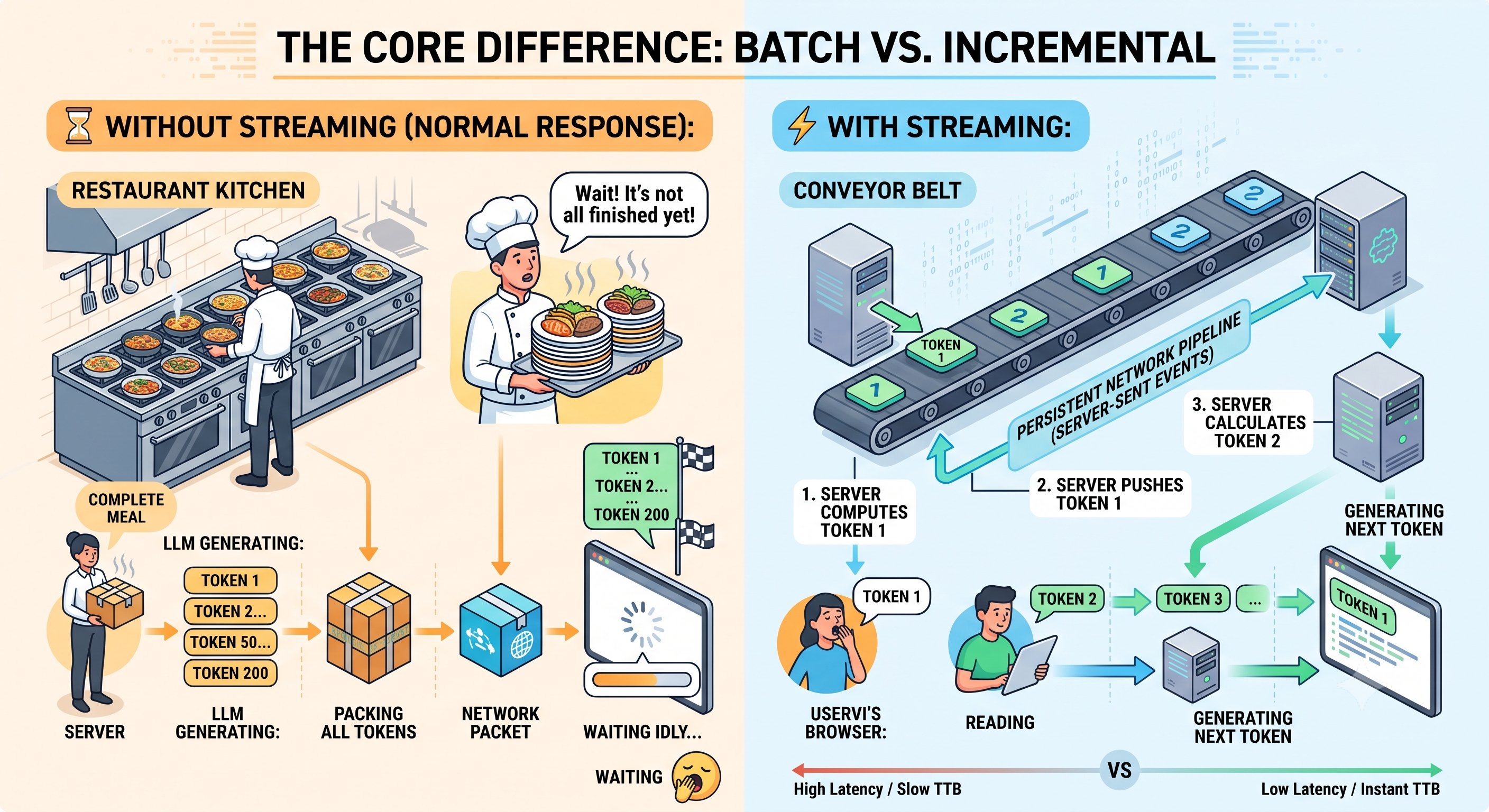
🔎 The Core Difference: Batch vs. Incremental
Streaming reduces Time to First Token (TTFT) by shifting from a "batch delivery" model to an "incremental delivery" model, allowing users to see data as soon as it is generated rather than waiting for the entire computation to finish.
- ⏳ Without Streaming (Normal Response):
The server acts like a restaurant kitchen that refuses to serve any food until the entire multi-course meal is cooked. The client waits idly while the LLM generates token 1, token 2, token 50, and token 200. Only when the final token is generated does the server bundle the whole payload into a single network packet and ship it.
- ⚡ With Streaming:
The server acts like a conveyor belt. The second the LLM computes Token 1, the server pushes it down a persistent network pipeline (Server-Sent Events) to the user's browser. While the user is already reading Token 1, the server is calculating Token 2.
📊 How the Math Changes Your TTFT
To understand the massive performance gap, look at how the total waiting time scales for a user:
| Phase | Without Streaming | With Streaming |
|---|---|---|
| User presses 'Submit' | 0.0 seconds | 0.0 seconds |
| Server/LLM warms up | ~0.2 seconds | ~0.2 seconds |
| Token 1 is generated | Server holds it in memory | Sent instantly to user (TTFT = ~0.25s) |
| Tokens 2 to 199 generated | Server holds them in memory | Sent sequentially as they generate |
| Token 200 (Last Token) | Server finally sends everything | Final token arrives |
| User sees first text | ~2.5 seconds later 🛑 | ~0.25 seconds later 🚀 |
💡 Why This Matters for User Experience (UX)
Human psychology perceives system speed based on responsiveness, not just completion time.
- Perceived Performance: A TTFT of 250ms makes an application feel instant and alive, even if the entire paragraph takes 3 seconds to finish printing. Waiting 3 seconds in total silence feels like the app is frozen.
- Cognitive Overlay: Humans read at roughly 200 to 250 words per minute. A streaming LLM generates text faster than the average human can read it, meaning the user can start consuming the answer immediately while the AI is still processing the remainder.