
Chapter 5: Spread & Rest Operators: Why is it foundational requirement for React Native Developers
Prerequisites & Mental Check
- Chapter 1 Fundamentals: Call Stack vs. Memory Heap; understanding that objects, arrays, and functions are stored as reference addresses (pointers) in the Heap, while variables in the Call Stack hold those pointer addresses.
- Chapters 2 & 4 Fundamentals: Arrow functions with concise implicit returns
({ ... })and ES6 Destructuring syntax.
📺 Video Explanation
Watch the full course with certification on : Udemy
In JavaScript and React Native, few syntax features are used as frequently—or misunderstood as fundamentally—as the three dots (...).
Depending strictly on syntactic context, the three dots perform two diametrically opposed operations: packing individual elements into a single collection (Rest), or unpacking structured collections into individual elements (Spread).
Mastering both is not merely a matter of clean code; it is a foundational requirement for mastering predictable state architecture, writing flexible component wrappers, and preventing silent rendering bugs in mobile runtimes.
1. Syntax Duality: Same Symbol, Two Opposing Operations
The JavaScript engine determines how to evaluate ... based entirely on where it appears in the Abstract Syntax Tree (AST):
Target Position: Receiving end of data(Parameters, Destructuring)  ──►  REST(Packs values in)
Source Position: Supplying end of data(Literals, Function calls) ──► SPREAD(Expands values out)| Context | Operator Name | Operation | Structural Transition |
|---|---|---|---|
| Destructuring Pattern | Rest | Collects remaining items | a, b, c ──► [...rest] |
| Function Signatures | Rest | Collects unassigned arguments | (x, y, ...args) ──► args = [] |
| Object / Array Literals | Spread | Unpacks items into a new container | [...arr] ──► el1, el2, el3 |
| Function Invocations | Spread | Passes elements as positional arguments | fn(...arr) ──► fn(a, b, c) |
2. Deep-Dive: How React Reconciliation & Reference Equality Work
Before mastering how to update state, you must understand why React Native requires brand-new object references to update the UI on mobile devices.
2.1 The Reconciliation Engine & State Diffing
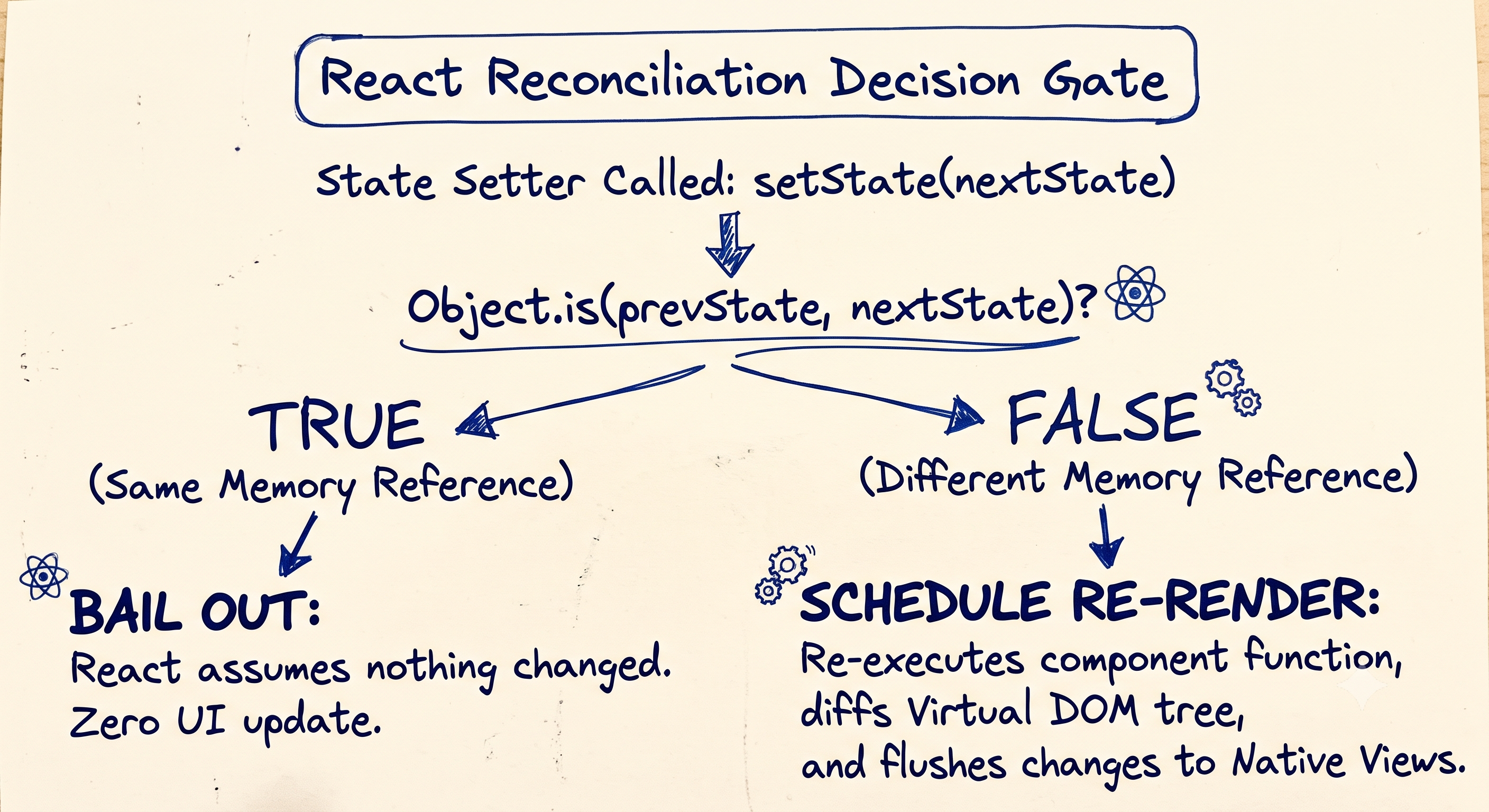
In React Native, your component tree represents a hierarchy of Native Views (e.g., RCTView, RCTTextView on iOS or ReactViewGroup on Android). When you call a state updater function (setState or setWorkout), React must decide: Did the application state actually change, and do I need to re-render this component and update the screen?
To keep mobile apps running at a smooth 60 or 120 FPS, React never performs deep, recursive checks on your nested state objects during state updates. Checking every nested key and sub-array on every user tap would cause massive performance lag ($O(N)$ tree-walking overhead).
Instead, React uses shallow reference equality via the ECMAScript Object.is() algorithm:
$$\text{Trigger UI Re-render?} \iff \text{Object.is}(\text{prevState}, \text{newState}) === \text{false}$$
2.2 Strict Equality (===) vs. Object.is()
React uses Object.is() rather than standard triple-equals (===) because Object.is() correctly handles JavaScript's two notorious mathematical edge cases:
NaN === NaNisfalse, butObject.is(NaN, NaN)istrue. (Setting state fromNaNtoNaNwill not cause an accidental loop).+0 === -0istrue, butObject.is(+0, -0)isfalse.
For all objects and arrays, however, Object.is(A, B) behaves identically to strict reference equality (A === B): it checks whether both operands point to the exact same memory address in the Heap.
3. The Spread Operator (...): Expanding Iterables & Objects
The spread operator takes an existing array, iterable, or object literal, iterates through its elements or enumerable properties, and projects them into a brand-new container allocated at a new heap address.
3.1 Spreading Arrays (Cloning & Concatenation)
When applied to an array, the engine consumes the array's built-in iterator ([Symbol.iterator]) to extract elements in sequential order.
const morning = ["stretch", "hydrate"];
const evening = ["walk", "meditate"];

// Cloning & Interspersing elements seamlessly into a new Heap slot
const fullDay = [...morning, "lunch", ...evening];
// Result: ["stretch", "hydrate", "lunch", "walk", "meditate"]
3.2 Spreading Objects (Merging & Overriding)
When applied to object literals, spread copies own enumerable key-value pairs into a new object. If the same key appears multiple times, the last assignment in the evaluation sequence overwrites any earlier assignment.
const defaults = { theme: "dark", fontSize: 16, notifications: true };
const userPrefs = { fontSize: 20, language: "en" };

const finalConfig = { ...defaults, ...userPrefs };
// Result: { theme: "dark", fontSize: 20, notifications: true, language: "en" }
3.3 Spreading Positional Function Arguments
Array spread can project array items directly into positional parameters:
const coordinates = [12.9716, 77.5946];
const setLocation = (lat, lng) => console.log(`Lat: ${lat}, Lng: ${lng}`);

setLocation(...coordinates); // Lat: 12.9716, Lng: 77.5946
4. Deep-Dive: JavaScript Engine Mechanics of Object Spread
To avoid subtle bugs, you must understand how ECMAScript actually evaluates { ...source } at the runtime layer.
┌───────────────────────────────────────────────────────────┐
│              Object Spread: Internal Pipeline             │
└───────────────────────────────────────────────────────────┘
 1. Check if source is null/undefined?
    ├── YES ──► Silently Ignore(Do nothing)
    └── NO  ──► Convert to Object: ToObject(source)
 2. Get own enumerable keys: [[OwnPropertyKeys]]()
 3. For each key:
    ├── Execute [[Get]](source, key) ──► Invokes Getter!
    └── Execute [[CreateDataProperty]](target, key, value)
4.1 What Spread Copies (and What It Skips)
- Prototype Chains are Dropped: Spread copies only own properties. Properties inherited through the prototype chain are completely ignored.
- Non-Enumerable Properties are Dropped: Properties configured with
enumerable: false(such as native class methods or properties defined viaObject.defineProperty) will not be copied. - Getters are Flattened: If
sourcehas a getter method, spread executes[[Get]]at copy time and stores the resulting primitive/object as a static property on the target. It does not transfer the getter function itself. - Symbols are Retained: Symbol-keyed properties are copied, provided they are enumerable.
const proto = { inheritedKey: "I will be ignored" };
const targetSource = Object.create(proto);

targetSource.visible = "I will be copied";
Object.defineProperty(targetSource, "hidden", {
  value: "secret",
  enumerable: false,
});

const cloned = { ...targetSource };
console.log(cloned.visible);      // "I will be copied"
console.log(cloned.inheritedKey); // undefined (Prototype dropped!)
console.log(cloned.hidden);       // undefined (Non-enumerable dropped!)
4.2 Falsy & Primitive Spreading Edge Cases
Object spread and Array spread handle non-object data types with fundamentally different rules:
// 1. Object Spread: Coerces primitives; silently ignores null/undefined
const safeObject = { ...null, ...undefined, ...true, ...42 };
console.log(safeObject); // {} (Empty object, no runtime exceptions thrown)

// String primitives have enumerable index properties:
const stringSpread = { ..."React" };
console.log(stringSpread); // { 0: 'R', 1: 'e', 2: 'a', 3: 'c', 4: 't' }

// 2. Array Spread: Demands a valid [Symbol.iterator]
// const badArray = [...null]; // 💥 TypeError: null is not iterable
5. The Rest Operator (...): Collecting Values In
Rest collects disconnected values and aggregates them into a clean JavaScript array or object.
5.1 Rest in Function Parameters vs. Legacy arguments
Before ES6, handling variable arguments required using the implicit arguments object. Rest parameters (...args) supersede arguments across modern codebases.
| Feature | Legacy arguments Object |
Modern Rest Parameter (...args) |
|---|---|---|
| Underlying Type | Array-like Object (length and index access only; lacks array methods) |
True Array Instance (Array.isArray(args) === true; inherits full Array.prototype) |
| Arrow Functions | ❌ Unavailable (inherits parent's arguments binding lexically) |
✅ Fully supported |
| Capture Scope | Inflexible; captures all parameters passed | Selective; captures only remaining unassigned arguments |
| Destructuring | ❌ Cannot be destructured within the signature | ✅ Can be directly destructured in-place |
// ❌ Legacy arguments object: Requires manual array conversions
function legacyLogger(prefix) {
  // arguments includes 'prefix' along with all trailing strings
  const messages = Array.prototype.slice.call(arguments, 1);
  return messages.map(msg => `${prefix}: ${msg}`);
}

// ✅ Modern Rest parameter: True Array, selective capture, arrow-ready
const modernLogger = (prefix, ...messages) => {
  return messages.map(msg => `${prefix}: ${msg}`);
};

console.log(modernLogger("WARN", "Network timeout", "Retrying..."));
// ["WARN: Network timeout", "WARN: Retrying..."]
5.2 Rest Destructuring for Property Omission
Rest destructuring offers an immutable pattern for stripping unwanted keys from an object:
const rawUser = {
  id: 101,
  username: "subrata_dev",
  passwordHash: "x89#kL@!",
  role: "admin",
};

// Omit 'passwordHash' without mutating the source object
const { passwordHash, ...sanitizedUser } = rawUser;

console.log(sanitizedUser); // { id: 101, username: "subrata_dev", role: "admin" }
6. Daily Production Patterns in React Native
6.1 Atomic Object State Updates
When calculating the next state from the previous state, pass a callback updater to avoid closure race conditions:
const [profile, setProfile] = useState({
  name: "Subrata",
  city: "Bengaluru",
  steps: 0,
});

setProfile(prev => ({
  ...prev,
  steps: prev.steps + 500,
}));
6.2 Array State: Appending, Prepending, and Modifying Items
Never use in-place array mutators (.push(), .pop(), .splice(), .sort()). Use immutable array expressions:
const [items, setItems] = useState([{ id: 1, text: "Buy Milk", done: false }]);

// Prepend item
const prependItem = (newItem) => setItems(prev => [newItem, ...prev]);

// Append item
const appendItem = (newItem) => setItems(prev => [...prev, newItem]);

// Update item immutably
const toggleDone = (id) => {
  setItems(prev => prev.map(item =>
    item.id === id ? { ...item, done: !item.done } : item
  ));
};

// Remove item immutably
const removeItem = (id) => {
  setItems(prev => prev.filter(item => item.id !== id));
};
6.3 Building Pass-Through Component Wrappers
Design systems use rest destructuring to extract layout-specific properties while forwarding remaining native props (onPress, testID, accessibility labels) via JSX spread:
import React from 'react';
import { TouchableOpacity, Text, StyleSheet } from 'react-native';

const PrimaryButton = ({ title, style, textStyle, ...touchableProps }) => (
  <TouchableOpacity
    style={[styles.button, style]}
    activeOpacity={0.7}
    {...touchableProps} // Forwards onPress, disabled, testID, onLongPress, etc.
  >
    <Text style={[styles.text, textStyle]}>{title}</Text>
  </TouchableOpacity>
);

const styles = StyleSheet.create({
  button: { paddingVertical: 12, paddingHorizontal: 20, backgroundColor: "#007AFF", borderRadius: 8 },
  text: { color: "#FFFFFF", fontWeight: "600", textAlign: "center" },
});
7. The Shallow Copy Trap & Memory Overhead
7.1 The Shallow Copy Caveat
Fundamental Memory Law: The spread operator clones only the first level of an object or array. Nested objects, arrays, and functions are copied by reference (their pointer addresses are copied, not their underlying heap data).
const state = {
  user: { name: "Subrata", address: { city: "Bengaluru" } },
  steps: 0,
};

const next = { ...state, steps: 500 };

// ⚠️ WARNING: next.user.address and state.user.address point to the EXACT SAME heap slot!
next.user.address.city = "Mumbai";
console.log(state.user.address.city); // "Mumbai" ❌ Original state was mutated!
7.2 Multi-Level Spread Architecture
To preserve pure immutability on deeply nested models, you must spread every level of the ancestor tree being altered:
const next = {
  ...state,
  user: {
    ...state.user,
    address: {
      ...state.user.address,
      city: "Mumbai", // ✅ Receives a unique reference at every modified ancestor node
    },
  },
};
7.3 Performance Overhead & Hermes Engine Garbage Collection (GC)
While spreading is fast, it is not free:
- Memory Allocation: Spreading an array of $N$ items creates an $O(N)$ allocation in the JavaScript engine heap.
- GC Pressure: In React Native running on the Hermes engine, frequent spread updates on large arrays (e.g., thousands of chat messages, live sensor telemetry, or continuous map coordinates) force high-frequency memory allocations that trigger Garbage Collection pauses, causing frame drops below 60 FPS.
Deep State Management Rule:
1-2 Levels of Nesting ──► Use native Spread({ ...prev })
3+ Levels of Nesting  ──► Normalize state or use Immer(Structural Sharing)
8. Hands-On State Update Exercises
Given the following workout state:
const [workout, setWorkout] = useState({
  userId: "u_001",
  date: "2026-06-29",
  exercises: ["pushups", "squats"],
  stats: {
    calories: 0,
    duration: 0,
  },
});
Task 1: Add "lunges" to the exercises array immutably.
setWorkout(prev => ({
  ...prev,
  exercises: [...prev.exercises, "lunges"],
}));
Task 2: Update calories to 320 inside stats without modifying duration.
setWorkout(prev => ({
  ...prev,
  stats: {
    ...prev.stats,
    calories: 320,
  },
}));
Task 3: Change date to "2026-06-30" and append "burpees" in a single batch update.
setWorkout(prev => ({
  ...prev,
  date: "2026-06-30",
  exercises: [...prev.exercises, "burpees"],
}));
9. Common Pitfalls & Antipatterns
Pitfall 1: Mutating Arrays Inside State Setter Callbacks
// ❌ FAILS: Mutates previous array in place and returns the same reference pointer
setLogs(prev => {
  prev.push(newEntry);
  return prev;
});

// ✅ FIX: Instantiates a new array container containing previous elements plus newEntry
setLogs(prev => [...prev, newEntry]);
Pitfall 2: Key Precedence Inversion
const baseTheme = { color: "blue", size: 16 };

// ❌ BUG: baseTheme is spread after custom overrides, overwriting your intended size
const bad = { size: 24, ...baseTheme }; // { size: 16, color: "blue" }

// ✅ FIX: Place fallback/defaults first; place explicit overrides after
const good = { ...baseTheme, size: 24 }; // { color: "blue", size: 24 }
Pitfall 3: Trailing Rest Parameters in Function Signatures
// ❌ SYNTAX ERROR: Rest must be the terminal parameter in the signature
// function process(first, ...rest, last) {}

// ✅ FIX: Rest parameter placed at the end of the argument list
function process(first, ...rest) {}
Technical Interview Questions
Q1: What will be logged to the console by the following code?
const itemA = { id: 1, details: { count: 10 } };
const itemB = { ...itemA };

itemB.details.count = 25;
itemB.id = 2;

console.log(itemA.id, itemA.details.count);
Output: 1 25
Explanation: id is a primitive value stored directly on the top-level object memory record; modifying itemB.id does not affect itemA.id. However, details holds a heap reference pointer; because spread performs only a shallow copy, both itemA.details and itemB.details point to the identical heap address.
Q2: What is the difference in behavior between Array Spread and Object Spread when handling null or undefined?
Answer:
- Object Spread (
{ ...val }): Evaluates safely without error. It coerces primitives and silently ignoresnull,undefined, and booleans, returning an empty object segment. - Array Spread (
[...val]): Requires the target value to implement the[Symbol.iterator]interface protocol. Spreadingnullorundefinedthrows an immediate runtime exception (TypeError: val is not iterable).
Q3: How does the Rest parameter solve scope and prototype limitations of the legacy arguments object in modern React Native functional components?
Answer:
- Arrow Function Lexical Binding: Arrow functions do not bind their own
argumentsobject (they inherit it from the surrounding lexical scope). Rest parameters (...args) provide local argument capture directly in arrow functions. - True Array Prototype: Rest produces an actual
Arrayinstance, allowing direct access to.map(),.filter(), and.reduce()without conversion overhead (Array.from(arguments)or[].slice.call(arguments)). - Selective Parameter Partitioning: Rest parameters allow explicitly naming leading parameters (e.g.,
(prefix, delimiter, ...messages)) and collecting only the trailing items, whereasargumentscaptures the entire argument list indiscriminately.
Q4: In React Native, why does this component fail to update its UI when the button is pressed?
const TaskList = () => {
  const [tasks, setTasks] = useState(["Design UI", "Write Code"]);

  const handleAdd = () => {
    tasks.push("Test App");
    setTasks(tasks);
  };

  return <Button title="Add" onPress={handleAdd} />;
};
Answer: Array.prototype.push() mutates the existing array in place. When passing tasks into setTasks(tasks), React performs a reference equality check via Object.is(prev, next). Because both variables hold the exact same pointer to the same heap location, React determines that state has not changed and bails out of the reconciliation cycle. To trigger a re-render, pass a new array reference: setTasks(prev => [...prev, "Test App"]).
Q5: How do you conditionally append a property to an object using spread and logical AND (&&) without adding an undefined key?
Answer:
const includeLocation = true;

const userPayload = {
  name: "Subrata",
  ...(includeLocation && { location: "Bengaluru" }),
};

// If includeLocation is true  ──► { name: "Subrata", location: "Bengaluru" }
// If includeLocation is false ──► { name: "Subrata" } (false is ignored by object spread)