5.1 Introduction
In the previous session, we prepared the foundation:
- Created the React Native project
- Structured the layered architecture
- Understood Repository and Service responsibilities
Today, we move from structure to infrastructure.
We will implement Encrypted Realm Initialization.
Important:
We are still not touching UI logic.
We are not implementing business rules.
We are not building features.
Today is strictly about the Core Layer and the Data Layer .
5.2 Why Encryption From Day One?
From the product definition , this application is:
“Your private digital life. Stored locally. Owned by you.”
Privacy is not an optional enhancement.
It is the core value proposition.
If we delay encryption:
- We risk accidental plaintext storage.
- We introduce refactor risk later.
- We compromise architectural integrity.
Therefore, encryption is implemented before any feature logic.
5.3 Today’s Scope
We will implement:
- Realm installation
- Entry schema definition
- Secure encryption key generation
- Secure key storage (Keychain / Keystore)
- Encrypted Realm configuration
- Centralized initialization inside
core/storage/
We will NOT:
- Build repository yet
- Build service logic
- Build UI features
5.4 Install Realm
Run:
npm install realm
For iOS:
cd ios && pod install && cd ..
Ensure the app still builds successfully.
5.5 Define Realm Schema
Inside:
src/core/storage/realmSchemas.ts
Create a basic Entry schema:
export const EntrySchema = {
  name: 'Entry',
  primaryKey: 'id',
  properties: {
    id: 'string',
    title: 'string',
    content: 'string',
    createdAt: 'date',
  },
};
This is raw structure.
No validation here.
No business rules here.
Schema belongs to Data Layer only.
5.6 Encryption Key Generation
Inside:
src/core/security/encryptionKey.ts
Create a function that:
- Generates a 64-byte random key
- Returns Uint8Array
Example concept:
import 'react-native-get-random-values';

export function generateEncryptionKey(): Uint8Array {
  const key = new Uint8Array(64);
  crypto.getRandomValues(key);
  return key;
}
This key must never be hardcoded.
5.7 Secure Key Storage
Inside:
src/core/security/secureStorage.ts
Use a secure storage library such as:
- react-native-keychain
Install:
npm install react-native-keychain
Store the encryption key securely on first launch.
Important rule:
- Never store encryption key in AsyncStorage.
- Never log key in production.
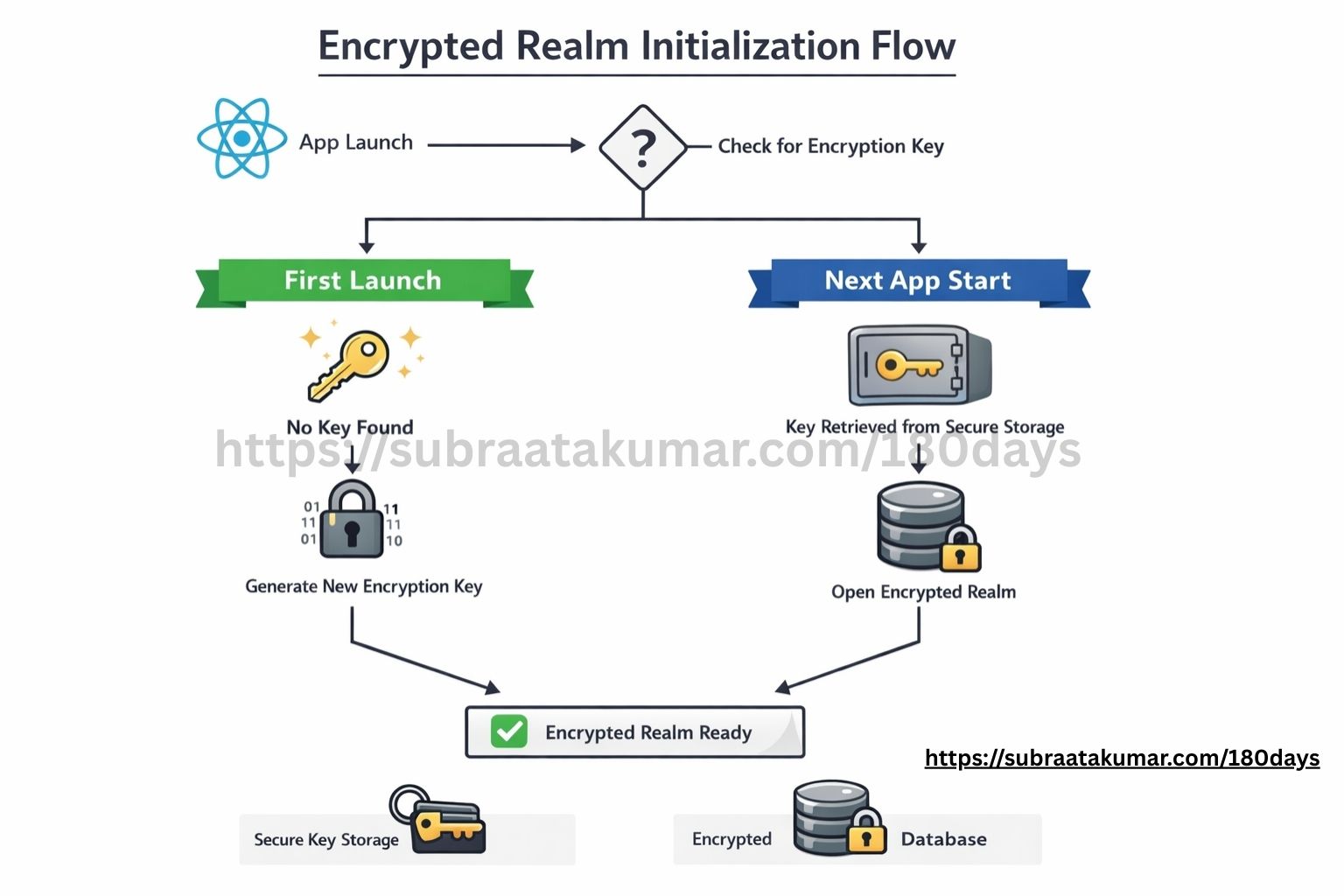
5.8 Encrypted Realm Initialization
Inside:
src/core/storage/realm.ts
Implement:
- Retrieve encryption key from secure storage.
- If it doesn’t exist:
- Generate new key
- Store it securely
- Initialize Realm using encryption key.
Concept:
const realm = await Realm.open({
  schema: [EntrySchema],
  encryptionKey: key,
});
This ensures the database is encrypted from day one.
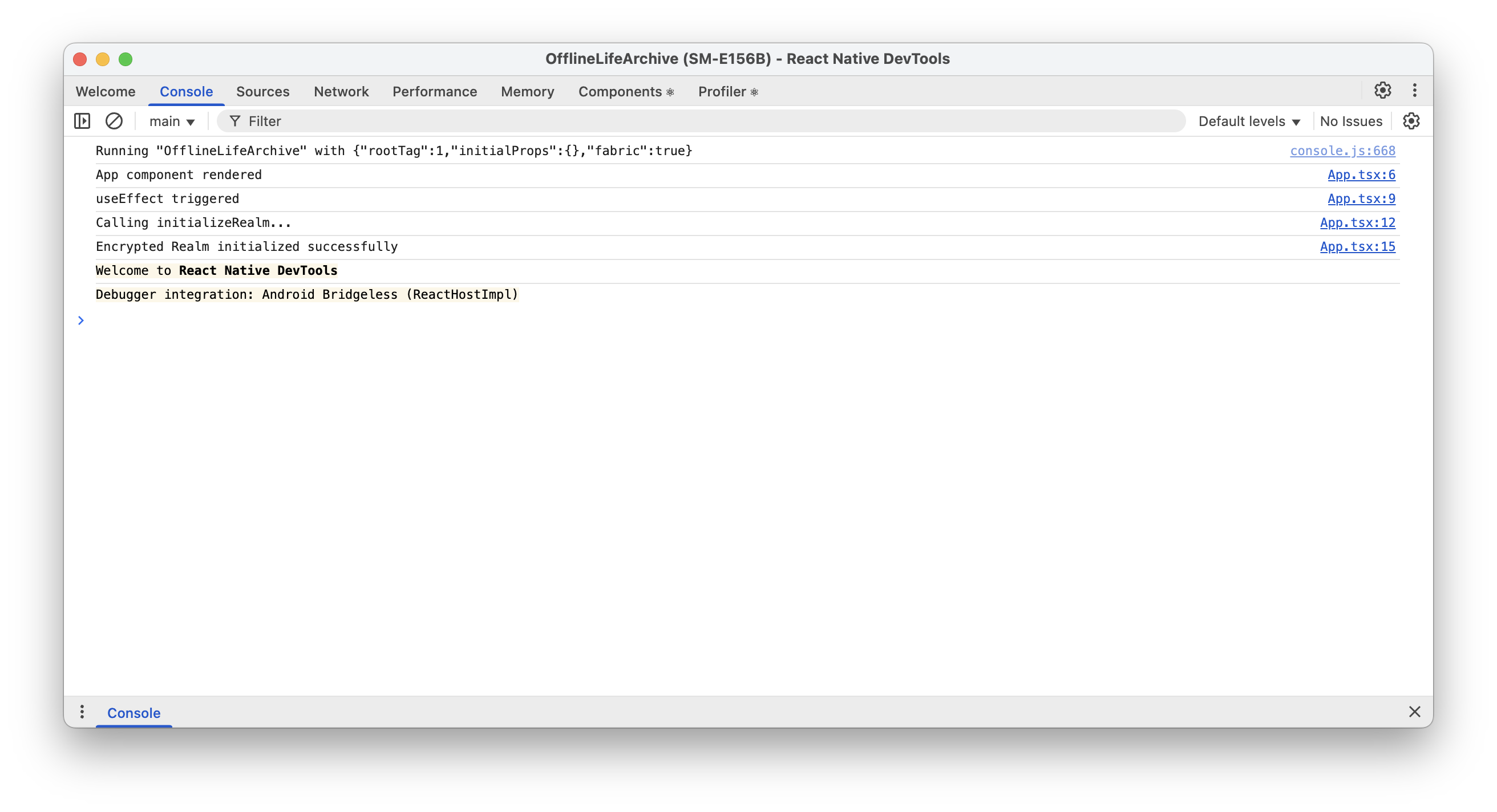
5.9 Test Initialization
Temporarily inside App.tsx:
- Call initialization function inside
useEffect - Log success message
You are not creating entries yet.
Just verify:
- Realm opens successfully
- Encryption key persists across reload
- App restarts without crashing
If it crashes after restart, your key handling is incorrect.
5.10 Architectural Discipline
Notice what we did NOT do:
- No repository
- No service
- No UI data rendering
We are respecting the layered model .
Today was about:
Core → Security
Data → Storage
Nothing else.
5.11 What This Phase Clarifies
By the end of Day 5, the architecture becomes more concrete:
- Realm is now encrypted from initialization.
- Encryption requires deliberate key management.
- The Core layer owns security infrastructure.
- The Data layer defines structural schemas.
- Business logic has not yet been introduced.
This stage reinforces an important distinction:
Encryption protects stored data.
Business rules govern how data is used.
Today was about protecting data at rest — not about feature implementation.
5.12 complete minimal production-ready files for Day 5.
These strictly implement:
- Encrypted Realm initialization
- Secure key generation
- Secure key storage
- Centralized initialization
No repository.
No service.
No UI logic.
Only Core + Data layer.
📁 1️⃣ src/core/storage/realmSchemas.ts
// src/core/storage/realmSchemas.ts

export const EntrySchema = {
  name: 'Entry',
  primaryKey: 'id',
  properties: {
    id: 'string',
    title: 'string',
    content: 'string',
    createdAt: 'date',
  },
};

export const schemas = [EntrySchema];
📁 2️⃣ src/core/security/encryptionKey.ts
// src/core/security/encryptionKey.ts

import 'react-native-get-random-values';

export function generateEncryptionKey(): Uint8Array {
  const key = new Uint8Array(64);
  crypto.getRandomValues(key);
  return key;
}
Install dependency:
npm install react-native-get-random-values
📁 3️⃣ src/core/security/secureStorage.ts
Using react-native-keychain.
Install:
npm install react-native-keychain react-native-quick-base64
Then:
// src/core/security/secureStorage.ts

import * as Keychain from 'react-native-keychain';
import { fromByteArray, toByteArray } from 'react-native-quick-base64';

const ENCRYPTION_KEY_ALIAS = 'offline_life_archive_key';

export async function storeEncryptionKey(key: Uint8Array) {
  const base64Key = fromByteArray(key);

  await Keychain.setGenericPassword(
    ENCRYPTION_KEY_ALIAS,
    base64Key,
    {
      service: ENCRYPTION_KEY_ALIAS,
      accessible: Keychain.ACCESSIBLE.WHEN_UNLOCKED_THIS_DEVICE_ONLY,
    }
  );
}

export async function getEncryptionKey(): Promise<Uint8Array | null> {
  const credentials = await Keychain.getGenericPassword({
    service: ENCRYPTION_KEY_ALIAS,
  });

  if (!credentials) return null;

  return toByteArray(credentials.password);
}
📁 4️⃣ src/core/storage/realm.ts
// src/core/storage/realm.ts

import Realm from 'realm';
import { schemas } from './realmSchemas';
import { generateEncryptionKey } from '../security/encryptionKey';
import { storeEncryptionKey, getEncryptionKey } from '../security/secureStorage';

let realmInstance: Realm | null = null;

export async function initializeRealm(): Promise<Realm> {
  if (realmInstance) {
    return realmInstance;
  }

  let key = await getEncryptionKey();

  if (!key) {
    key = generateEncryptionKey();
    await storeEncryptionKey(key);
  }

  realmInstance = await Realm.open({
    schema: schemas,
    encryptionKey: key,
  });

  return realmInstance;
}

export function getRealm(): Realm {
  if (!realmInstance) {
    throw new Error('Realm has not been initialized.');
  }

  return realmInstance;
}
📁 5️⃣ Temporary App.tsx Test Initialization
import React, { useEffect } from 'react';
import { View, Text } from 'react-native';
import { initializeRealm } from './src/core/storage/realm';

export default function App() {
  console.log('App component rendered');

  useEffect(() => {
    console.log('useEffect triggered');

    async function init() {
      console.log('Calling initializeRealm...');
      try {
        await initializeRealm();
        console.log('Encrypted Realm initialized successfully');
      } catch (error) {
        console.error('Realm initialization failed:', error);
      }
    }

    init();
  }, []);

  return (
    <View style={{ padding: 20 }}>
      <Text>Offline Life Archive</Text>
    </View>
  );
}
🔐 What This Achieves
When the app runs:
- It checks secure storage for encryption key.
- If missing → generates new 64-byte key.
- Stores key securely in Keychain / Keystore.
- Opens Realm using that encryption key.
- Persists the same key across app restarts.
Database is encrypted from first launch.
⚠ Important Notes
For iOS
After installing keychain:
cd ios
pod install
cd ..
For Android
Ensure minSdkVersion ≥ 23 (recommended for secure keystore usage).
🧠 Architecture Integrity
Notice:
- Encryption logic →
core/security - Storage config →
core/storage - No module touched
- No UI business logic
- No repository yet
This keeps boundaries intact exactly as defined in your blueprint.
Today’s Takeaway on Vibe Coding
Today I hit a small but important moment while implementing encrypted Realm.
React Native threw this error:
ReferenceError: Property 'Buffer' doesn't exist
I asked AI for a solution.
It suggested a base64 package. It would work.
But then I checked something simple:
Last maintained — 5 years ago.
That’s where “vibe coding” could have taken over.
Install it. Move on. Ship it.
Instead, I paused.
Encryption is infrastructure. Infrastructure should not depend on outdated libraries.
So I questioned the solution. Asked again. Explored alternatives. Found a modern, actively maintained React Native–specific package. Switched.
It worked.
What Vibe Coding Should Actually Mean
Vibe coding is not blindly pasting AI-generated code.
It’s:
- Moving fast
- Thinking critically
- Validating suggestions
- Making architectural decisions consciously
AI accelerates output.
But engineering judgment protects the system.
Don’t compete with AI.
Don’t blindly follow AI.
Evolve with AI.
That’s today’s real takeaway.
🧠 Professional Rule
For encryption infrastructure:
Never use:
- Outdated libraries
- Polyfills
- Workarounds
Always use:
- Native-safe
- Maintained
- Binary-aware libraries
Common errors and fixes:
Deprecated Gradle features were used in this build, making it incompatible with Gradle 10.
🚀 Fix It Step-by-Step (Do Exactly This)
✅ 1️⃣ Stop Everything
Stop Metro:
Ctrl+ C
Kill any running Gradle daemon:
./gradlew--stop
✅ 2️⃣ Delete Gradle Caches (Most Important)
Run:
rm-rf ~/.gradle/caches
rm-rf android/.gradle
rm-rf android/build
Then clean project:
cd android
./gradlew clean
cd ..
✅ 3️⃣ Clear Node Modules
rm-rf node_modules
rm-rf package-lock.json
npm install
✅ 5️⃣ Run Again
Start Metro:
npx react-nativestart--reset-cache
In another terminal:
npx react-native run-android
🔐 Day 5 — Encryption Verification Checklist
✅ 1️⃣ App Launch Test
Expected behavior:
-
App runs without crashing.
-
Console logs:
Encrypted Realm initialized successfully
If the app crashes on first launch:
- Check if encryption key generation failed.
- Check if secure storage permission errors occurred.
- Ensure
react-native-get-random-valuesis properly installed.
✅ 2️⃣ Restart Persistence Test (Most Important)
Steps:
- Launch the app.
- Close it completely.
- Reopen it.
Expected:
- No crash.
- Realm initializes successfully again.
If it crashes on second launch:
👉 This means the encryption key is not being retrieved properly.
Most likely issue:
- Key not stored correctly.
- Key retrieved with wrong encoding.
Encryption only works if the same key is reused.
✅ 3️⃣ Force Failure Test (Proves Encryption Is Real)
Temporarily modify realm.ts:
Replace:
encryptionKey: key,
With:
encryptionKey: generateEncryptionKey(),
Now restart the app.
Expected:
-
Realm should throw an error:
"Decryption failed" or similar message.
This proves:
✔ Realm is actually encrypted
✔ It cannot open without the correct key
After testing, revert the change.
✅ 4️⃣ Delete App Test
Uninstall the app from device.
Reinstall and run again.
Expected:
- New encryption key generated.
- Fresh Realm database created.
- No crash.
Because Keychain entry is removed when app is deleted.
✅ 5️⃣ Verify No Plaintext Database
On Android:
Navigate to:
/data/data/<your.package.name>/files/
Pull the Realm file.
Open it with a text editor or hex viewer.
Expected:
- You should NOT see readable strings like entry titles.
- Data should appear binary / unreadable.
If you see readable text:
🚨 Encryption is not applied.
✅ 6️⃣ Ensure Key Is Never Logged in Production
Search your codebase:
- Ensure encryption key is never console.logged.
- Ensure no debug statements expose it.
You may log it temporarily in __DEV__, but remove before production.
✅ 7️⃣ Confirm Realm File Exists
Add temporary log:
console.log(Realm.defaultPath);
Confirm:
- File path exists.
- Database file size increases after adding data (later).
This confirms actual storage location.
🚨 Common Mistakes
❌ Using AsyncStorage for encryption key
❌ Generating a new key every launch
❌ Storing key without base64 encoding
❌ Forgetting to pod install (iOS)
❌ Using incorrect key length (must be 64 bytes)
🧠 Final Confirmation Logic
If all these are true:
- App runs on first launch
- App runs on restart
- App fails when key is changed
- Database file unreadable externally
Then:
✔ Encryption is correctly implemented
✔ Key management is stable
✔ Core layer is functioning
This checklist converts encryption from theory → verified infrastructure.
Next:
Day 6 — Repository Layer Implementation
(Warehouse clerk comes to life in code.)