4.1 Introduction
In the previous chapter, we defined the architectural philosophy and layered structure of Offline Life Archive. We intentionally avoided writing feature-level code.
In this chapter, we begin implementation — but not at the UI layer.
Instead, we implement the secure infrastructure foundation, specifically:
- Encryption key generation and storage
- Encrypted Realm configuration
- Repository layer structure
- Service layer boundary enforcement
The goal of this chapter is to ensure that all future features operate on a secure and maintainable base.
4.2 Why Infrastructure Comes Before UI
In many projects, developers begin by building screens and connecting them directly to storage.
This approach introduces:
- Tight coupling between UI and data layer
- Refactor risk when database logic changes
- Security logic scattered across the codebase
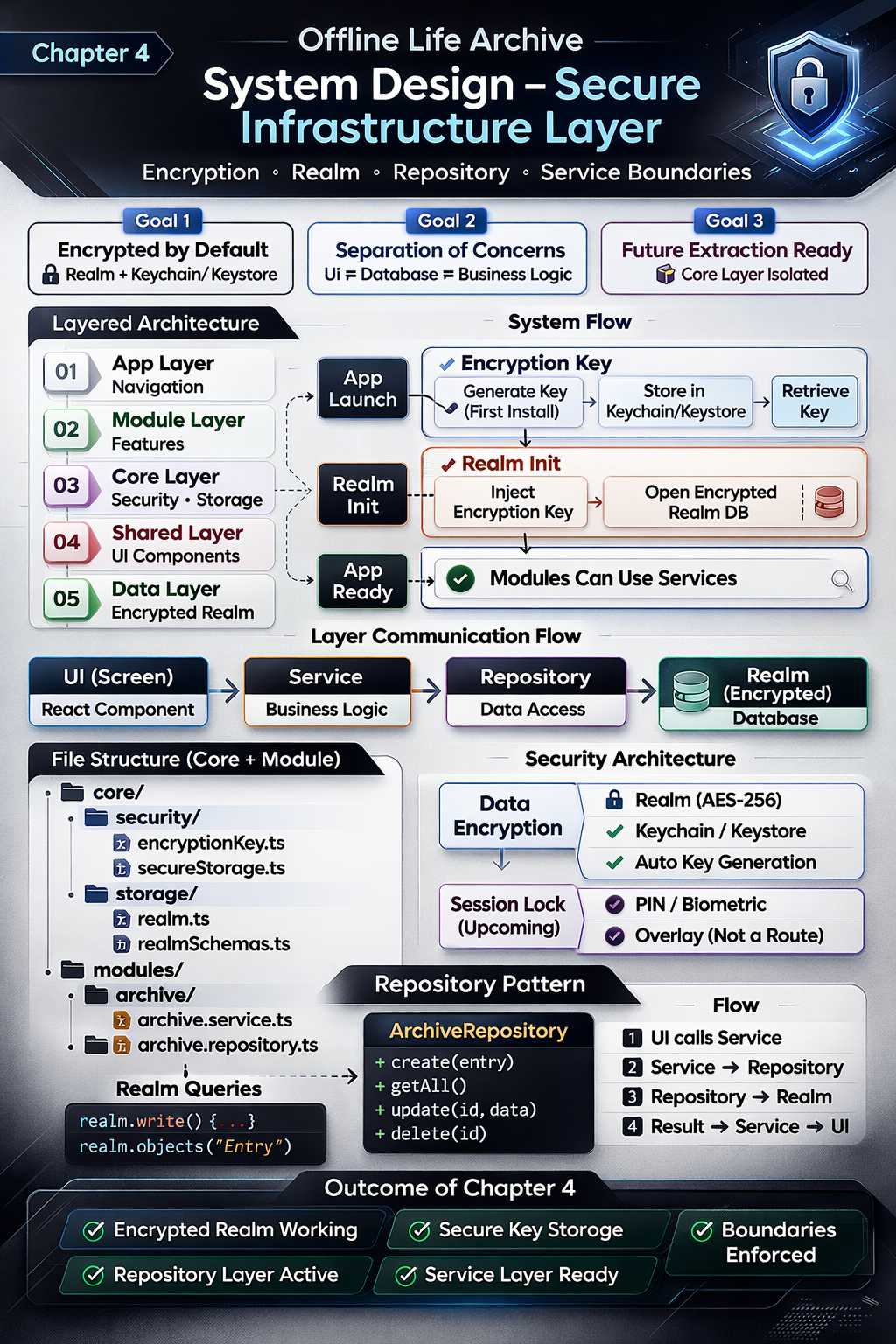
Our architecture blueprint:
App Layer
Module Layer
Core Layer
Shared Layer
Data Layer
This chapter implements the Core and Data layers first.
4.3 Encryption Key Strategy
4.3.1 Requirement
From the product definition , the application must:
- Store all data locally
- Encrypt the database
- Generate a unique key per installation
4.3.2 Implementation Goals
- Generate a 64-byte random encryption key on first launch.
- Store the key securely:
- iOS → Keychain
- Android → Keystore
- Never store the key in AsyncStorage.
- Never expose the key in production logs.
4.3.3 File Structure
core/
  security/
    encryptionKey.ts
    secureStorage.ts
4.3.4 Responsibility Boundaries
encryptionKey.ts→ Handles key generation.secureStorage.ts→ Handles platform-secure storage.- Modules never access secure storage directly.
This ensures encryption remains infrastructure-level logic.
4.4 Encrypted Realm Configuration
4.4.1 Centralized Database Configuration
All database configuration resides in:
core/storage/realm.ts
core/storage/realmSchemas.ts
This provides:
- Single point of configuration
- Centralized schema management
- Encryption enforcement
4.4.2 Encrypted Initialization Flow
The initialization process:
- Retrieve encryption key from secure storage.
- If key does not exist:
- Generate new key.
- Store securely.
- Initialize Realm with encryption key.
- Expose configured Realm instance.
Pseudo-flow:
const key = await getOrCreateEncryptionKey();

const realm = await Realm.open({
  schema: schemas,
  encryptionKey: key,
});
No screen imports Realm directly.
4.5 Repository Pattern
Real-World Analogy
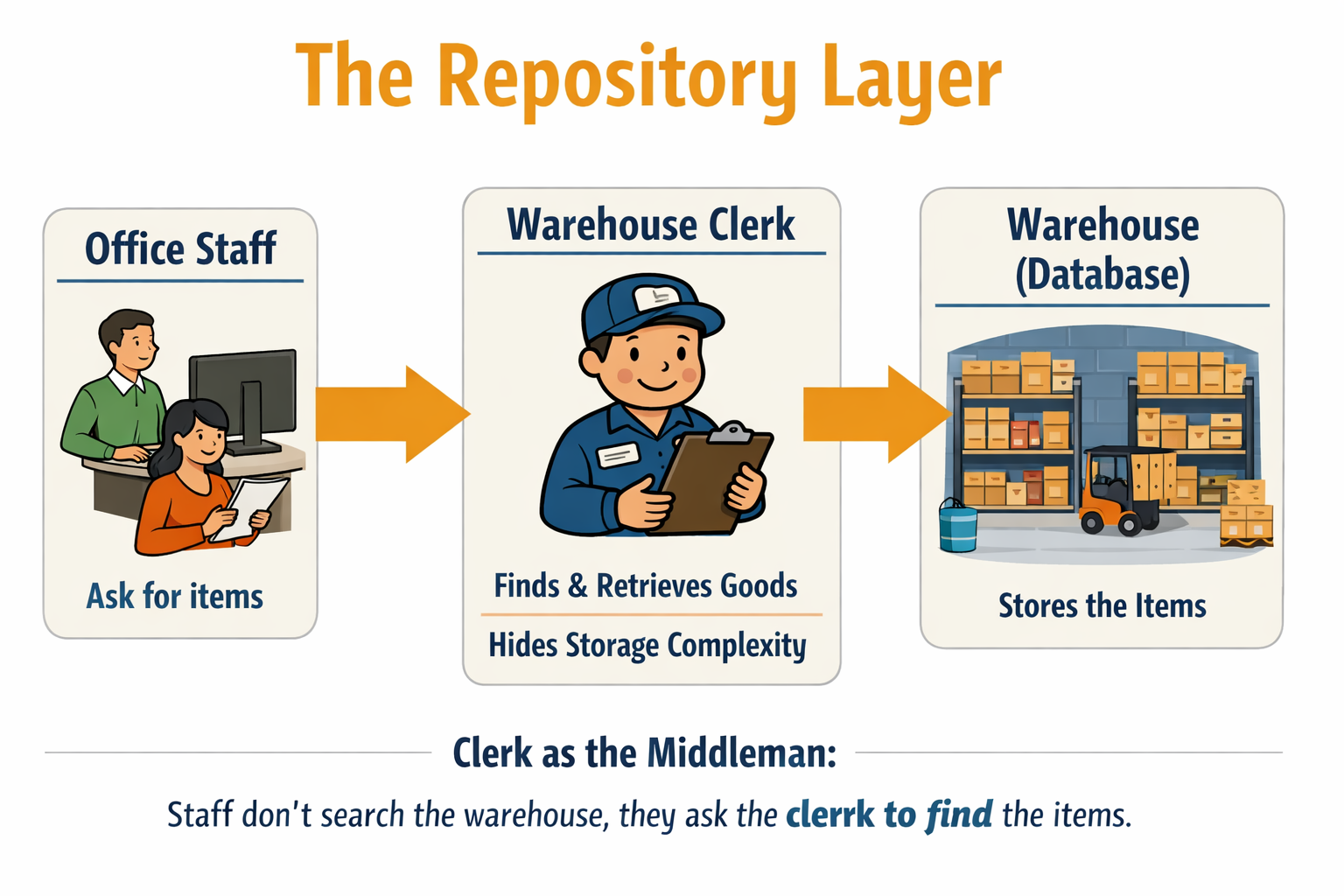
To understand the Repository Layer, imagine a large warehouse that stores thousands of goods. The warehouse is organized with shelves, codes, storage rules, and inventory systems. It is complex inside.
Now imagine the staff working in the office. When they need an item, They do not search shelves, decode storage labels, or manage inventory records.
Instead, they approach the warehouse clerk.
The warehouse clerk knows:
- Where items are stored
- How inventory is organized
- How goods are retrieved
- How returns are handled
The office staff simply say, “Bring item X.”
The clerk retrieves it and hands it over.
In this analogy:
- The warehouse represents the database.
- The warehouse clerk represents the repository.
- The office staff represent the rest of the application.
The repository hides the complexity of storage. It provides a clean and controlled way to access data. The application does not need to know how the database is structured internally — it only communicates with the repository.
This improves clarity, reduces duplication, and prevents different parts of the application from interacting with storage in inconsistent ways.
4.5.1 Why a Repository Layer?
Direct database access from UI introduces:
- Schema dependency in presentation layer
- Business logic leakage
- Testing complexity
Instead, we introduce:
modules/
  archive/
    archive.repository.ts
4.5.2 Repository Responsibilities
- Create entry
- Fetch entries
- Update entry
- Delete entry
Example structure:
export class ArchiveRepository {
  create(entryData) {}
  getAll() {}
  delete(id) {}
}
The repository is the only layer allowed to interact with Realm.
Repository Pattern: Trade-offs and Justification
Some developers argue that introducing a repository layer can add unnecessary complexity, especially in small projects. Modern ORMs often already provide abstraction over database operations, making an additional repository seem redundant or even a potential performance overhead. In simple CRUD applications, wrapping an ORM with another layer may result in boilerplate code without delivering meaningful architectural benefits.
However, in the context of Offline Life Archive, the repository layer is not merely an ORM wrapper — it enforces architectural boundaries. It prevents direct database access from UI components, isolates business logic, supports encryption control, and keeps the system extraction-ready for future evolution. The slight increase in structural code is a deliberate trade-off for long-term maintainability, modularity, and security integrity.
4.6 Service Layer
Why the Warehouse Clerk Is Not Enough
In the previous section, we saw how the warehouse clerk (Repository) protects access to the warehouse (Database). Office staff do not walk into storage directly — they request items through the clerk. This keeps storage organized and controlled.
However, imagine the office staff now need more than simple item retrieval.
Suppose they ask:
- “Can we ship 500 units today?”
- “Is this customer eligible for priority dispatch?”
- “Do we have enough stock across multiple sections?”
- “If one item is unavailable, should we cancel the entire order?”
The warehouse clerk cannot answer these questions. The clerk only knows how to retrieve items from shelves.
This is where the Warehouse Manager becomes essential.
The Role of the Warehouse Manager
The warehouse manager does not personally fetch goods from shelves. Instead, the manager:
- Applies company rules
- Checks policies and limits
- Validates requests
- Coordinates multiple item retrievals
- Decides whether an operation should proceed
Only after making those decisions does the manager instruct the clerk to retrieve items.
In our architecture:
- Warehouse → Database
- Warehouse Clerk → Repository
- Warehouse Manager → Service Layer
- Office Staff → UI
The manager ensures business rules are followed.
The clerk ensures data is retrieved correctly.
Without a manager, staff would rely only on the clerk. Storage would remain organized, but business logic would become inconsistent and scattered.
Architectural Insight
Repository protects storage access.
Service protects business rules.
You need both for a scalable system.
This layered separation aligns directly with the architectural philosophy defined earlier — keeping business logic isolated and preventing cross-contamination between layers.
That is why the Service Layer exists — even when the Repository Layer is already in place.
4.6.1 Purpose
The service layer contains business logic.
It does not:
- Render UI
- Directly initialize Realm
It does:
- Validate data
- Transform models
- Coordinate repository calls
Location:
modules/archive/archive.service.ts
Example flow:
UI → Service → Repository → Realm
This ensures UI remains presentation-only.
4.7 Layer Communication Flow
With infrastructure implemented, the flow is now:
Screen (UI)
   ↓
Service (Business Logic)
   ↓
Repository (Data Access)
   ↓
Encrypted Realm (Data Layer)
Each layer has a single responsibility.
No cross-contamination.
4.8 What We Intentionally Did Not Implement
To preserve architectural clarity, we did not:
- Add global state management
- Introduce Redux or similar libraries
- Implement theme toggling UI
- Build feature screens
- Implement sharing logic
Complexity is introduced only when required.
4.9 Security Considerations
Security is divided into two independent layers:
- Data Encryption
- Protects stored data
- Implemented via encrypted Realm
- Session Lock (Future Chapter)
- Protects access while app is open
- Implemented as overlay (not navigation route)
Separation ensures flexibility and maintainability.
4.10 Outcome of This Chapter
At the end of this chapter, the application can:
- Launch successfully
- Generate and securely store an encryption key
- Initialize an encrypted Realm database
- Persist data via repository
- Maintain strict architectural boundaries
No UI has been built yet.
However, the system foundation is complete.
4.11 Key Takeaways
- Infrastructure precedes features.
- Encryption is not an optional add-on.
- Repository pattern isolates database logic.
- Service layer isolates business logic.
- UI must remain free of data-layer dependencies.
This approach ensures:
- Reduced refactor risk
- Clear separation of concerns
- Long-term scalability
- Extractable core architecture
Perfect. Below is a clean book-style section you can directly place before the practicals.
Chapter 4 Practical – Step 0: Project Setup
Before implementing encryption, repositories, or services, we must first create a clean and production-ready React Native project.
Architecture only makes sense when it lives inside a real application. This step ensures that our development environment is correctly configured and that the project structure aligns with our architectural blueprint .
4.0.1 Environment Checklist
Before creating the project, ensure the following tools are installed:
- Node.js (LTS version recommended)
- Android Studio (for Android development)
- Xcode (for iOS – macOS only)
- Java JDK (if required by Android setup)
Follow this link : https://reactnative.dev/docs/getting-started-without-a-framework
4.0.2 Create the React Native Project
We will use the React Native CLI (not Expo managed workflow), since this project requires full native control for encryption and secure storage.
Run:
npx @react-native-community/cli@latest init OfflineLifeArchive
Navigate into the project folder:
cd OfflineLifeArchive
4.0.3 Run the Application
Android
npx react-native run-android
iOS (macOS only)
npx react-native run-ios
If everything is configured correctly, the default React Native welcome screen should appear.
This confirms:
- Metro bundler is working
- Native build pipeline is working
- Emulator/device connection is working
Do not proceed unless the app runs successfully.
4.0.4 Clean the Default Template
Open App.tsx and remove the default template code. Replace it with a minimal placeholder:
import React from 'react';
import { View, Text } from 'react-native';

export default function App() {
  return (
    <View>
      <Text>Offline Life Archive</Text>
    </View>
  );
}
We intentionally keep it simple.
No navigation yet.
No dependencies yet.
No architecture yet.
Just a working base.
4.0.5 Create the Production Folder Structure
Inside the project root, create the following structure:
src/
  app/
  core/
  modules/
  shared/
This mirrors the layered architecture model defined earlier .
At this stage, the folders will be empty. That is intentional.
We are preparing structure before adding complexity.
4.0.6 Why This Step Matters
Many developers rush into feature implementation without:
- Verifying environment stability
- Cleaning default scaffolding
- Preparing folder structure
We do the opposite.
We:
- Ensure environment works.
- Establish clean project boundaries.
- Then begin infrastructure implementation.
Architecture without foundation is theory.
Architecture inside a running project is engineering.
Once this setup is complete, we are ready to implement:
- Encrypted Realm initialization
- Repository layer
- Service layer
- End-to-end data flow
The foundation is now ready.
📘 What Today Is Actually For
Today’s objective:
Ensure a stable, clean, structured React Native project.
Today we should:
- Create React Native CLI app
- Run it successfully
- Clean default template
- Create
src/structure - Understand the 5-layer model
- Review repository & service analogies
That’s it.
No database yet.
No encryption yet.
No real feature code yet.
🚀 What Happens Next?
Day 5
Encrypted Realm initialization (Core + Data layer only)
Day 6
Repository implementation (Data abstraction)
Day 7
Service layer implementation (Business rules)
Day 8
End-to-end flow (UI → Service → Repository → Realm)